Next Level EDUcation! Students Can Now Sign In to Assemblr EDU with Their belajar.id Account
.jpg)
Great news for students across Indonesia! Students can now use their belajar.id account to access Assemblr EDU. Through this integration, students can enjoy a variety of exclusive benefits that support learning while fostering creativity through 3D and Augmented Reality (AR) technology.
With access now available for students, learning is no longer limited to reading textbooks or listening to classroom explanations. Instead, students can explore learning materials in a more visual, interactive, and engaging way using their belajar.id account.
What Is the belajar.id Account Integration with Assemblr EDU?
.jpg)
The belajar.id account integration allows users to sign in to Assemblr EDU using their belajar.id account and unlock exclusive learning benefits.
Previously, these benefits were available only to teachers, helping them create more interactive learning materials. Now, students can also access Assemblr EDU with their belajar.id account, making classroom learning more collaborative between teachers and students.
Student belajar.id Domains Eligible for Assemblr EDU Benefits
.jpg)
Students with the following belajar.id domains are now eligible to receive exclusive Assemblr EDU benefits:
- sd.belajar.id
- smp.belajar.id
- sma.belajar.id
- smk.belajar.id
Teachers can also access Assemblr EDU using their belajar.id account. Read our blog to learn more about teacher benefits.
What Benefits Do Students Get?
.jpg)
Students who sign in with a belajar.id account can access a variety of premium features in Assemblr EDU, making learning more engaging, interactive, and creative.
- Create with the 3D/AR Editor and Thousands of 3D Objects
Powered by more than 6,000 3D objects in the main 3D Library, plus 1,237 exclusive 3D objects for belajar.id users, students can create presentations, school assignments, and interactive learning projects with ease.
Creative features such as Visual Coding and Animations allow students to build engaging interactive experiences without complicated programming. Instead of simply consuming learning materials, students can develop creativity, critical thinking, and communication skills by expressing their ideas through digital projects. - Explore 10 Digital Learning Aids Every Day
Understanding complex concepts becomes easier with 3D and AR Digital Learning Aids in Assemblr EDU. Students using a belajar.id account can access up to 10 Digital Learning Aids every day, making it easier to explore subjects visually and interactively. From science and mathematics to history and many other subjects, learning becomes more enjoyable and easier to understand. - Learn Independently with 295 Ready-to-Use Learning Topics
Assemblr EDU provides 295 ready-to-use learning topics enhanced with 3D and AR elements to support independent learning. These learning topics cover educational levels from Kindergarten to Senior High School and are aligned with the curriculum. Students can use them to preview lessons before class, review materials at home, or deepen their understanding of concepts learned in school. - Even More Exclusive Benefits
In addition to the features above, students using a belajar.id account also receive several exclusive benefits, including 3 Custom AR Marker slots, 150 MB of cloud storage, free access to the Duplicate Project feature, and various additional features that support learning and creativity
These benefits empower students to enjoy a richer learning experience while exploring their creativity through 3D and Augmented Reality (AR).
Supporting More Interactive Learning
.jpg)
The availability of belajar.id access for students creates new opportunities for more collaborative learning experiences. Teachers can share interactive learning materials through Assemblr EDU, while students can immediately access and explore those materials using their own belajar.id account.
With 3D and AR technology, students can observe objects from different perspectives, interact with learning content, and even create their own projects, making learning more engaging and meaningful.
How to Access Assemblr EDU with Belajar.id Account?
To use Assemblr EDU with your belajar.id account, you can sign in to Assemblr EDU by selecting the “Sign in with Belajar.id” option.
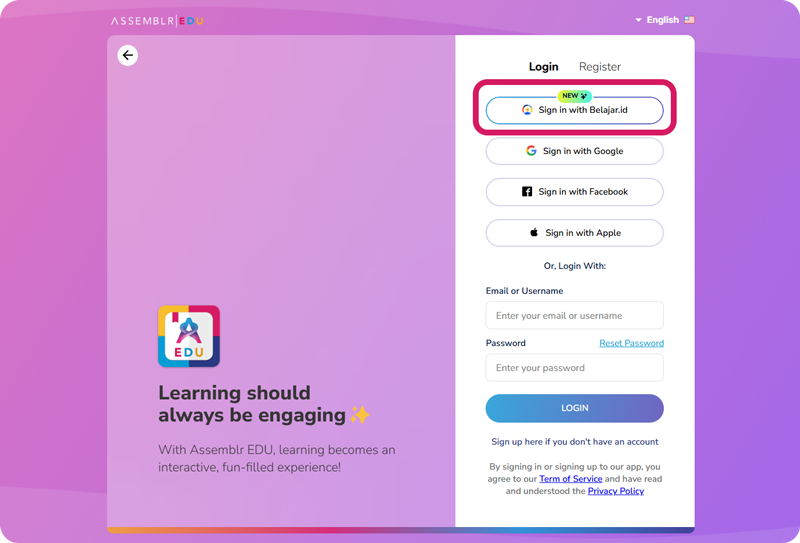
For further information regarding how to log in, or how to create an account (for new users), you can visit our official guidelines here.
Start learning, creating, and exploring with 3D and Augmented Reality today with Assemblr EDU and your belajar.id account!
.jpg)